How to calculate a tip
Short answer. Move the decimal one place left to get 10% of the bill, then scale it. Double it for 20%, or add half of it for 15%. On a 62.40 bill: 10% is 6.24, 15% is 9.36, 18% is 11.23 and 20% is 12.48. Add the tip to the bill for the total.
Every tip calculation is the same calculation wearing a different percentage. Find 10%, then scale. You never need to multiply anything by 0.18.
The one move
Ten percent of any number is that number with the decimal point shifted one place to the left. No arithmetic, just a change of address:
Bill        62.40
10%          6.24    the decimal moved one place left
 5%          3.12    half of the 10%
 1%          0.624   the decimal moved twice
Those three numbers build every common tip rate between them.
The three rates people actually use
15%   10% + 5%        6.24 + 3.12   =   9.36
20%   10% doubled     6.24 × 2      =  12.48
18%   20% − 2%       12.48 − 1.25   =  11.23
15% is the 10% plus half of it again. 20% is the easiest of the lot, which is a large part of why it became the default rate in the United States. It is not generosity, it is arithmetic that fits in your head.
18% is the awkward one, so approach it from above rather than below. Take 20%, then knock off 2%. Two percent of 62.40 is 1.248, call it 1.25, and 12.48 minus 1.25 is 11.23. The exact answer is 62.40 × 0.18 = 11.232, which rounds to 11.23. The shortcut and the long way agree to the cent.
Then add it on
Bill              62.40
Tip 20%          +12.48
──────────────────────
Total             74.88
If you would rather leave a round number, work backwards from the total instead. Taking 74.88 up to 75.00 makes the tip 12.60, which is 20.19% of the bill. Rounding the total up almost always lands you a fraction of a percent above the rate you aimed for, which is the correct direction to miss.
Splitting that total between several people is its own small problem, mostly about which way to round. We worked it through in how to split a bill with tip.
Quick reference
The three rates on a few bill sizes, rounded to the cent:
| Bill | 15% | 18% | 20% |
|---|---|---|---|
| 20.00 | 3.00 | 3.60 | 4.00 |
| 35.00 | 5.25 | 6.30 | 7.00 |
| 62.40 | 9.36 | 11.23 | 12.48 |
| 87.25 | 13.09 | 15.71 | 17.45 |
| 100.00 | 15.00 | 18.00 | 20.00 |
The 100.00 row is the one to memorise, because every other bill is a slide of the decimal point away from it.
Before or after tax
The convention in the United States is to tip on the pre-tax subtotal. The difference is small enough that most people do not bother. Say the tax on our 62.40 subtotal is 8%:
Subtotal          62.40
Tax 8%           + 4.99
──────────────────────
Total             67.39

Tip 20% on 62.40  12.48   pre-tax
Tip 20% on 67.39  13.48   post-tax
A dollar apart. Tipping on the pre-tax amount is the one you can defend at the table, and tipping on the post-tax total is the one that takes less thinking. Both are normal. Nobody is keeping score.
The cent that floating point loses
Here is a real one. A 41.30 bill at 15%:
Exactly           41.30 × 0.15  =  6.1950   →  6.20
In binary         41.30 × 0.15  =  6.194999999999999   →  6.19
The exact answer sits precisely on the half cent, so it rounds up to 6.20. Most calculators do not compute the exact answer. They store 41.30 and 0.15 as the nearest available binary fractions, and the product lands a hair below 6.195, so it rounds down to 6.19 instead. One cent, from a machine doing exactly what it was designed to do.
This is the same failure as the famous 0.1 + 0.2 returning 0.30000000000000004. A cent on a tip is nothing. The same drift repeated down a spreadsheet column, or through a split that has to reconcile against a card total, is not nothing. Prism computes with exact rational arithmetic and rounds only when it puts a number on screen, so 41.30 × 0.15 is 6.195 and rounds where it should.
Working backwards
To find out what rate you actually left, divide the tip by the bill and multiply by 100. A 9.36 tip on a 62.40 bill is 9.36 ÷ 62.40 × 100 = 15%. This is the calculation to run when a receipt helpfully prints suggested tip amounts and you would like to know what it is quietly suggesting.
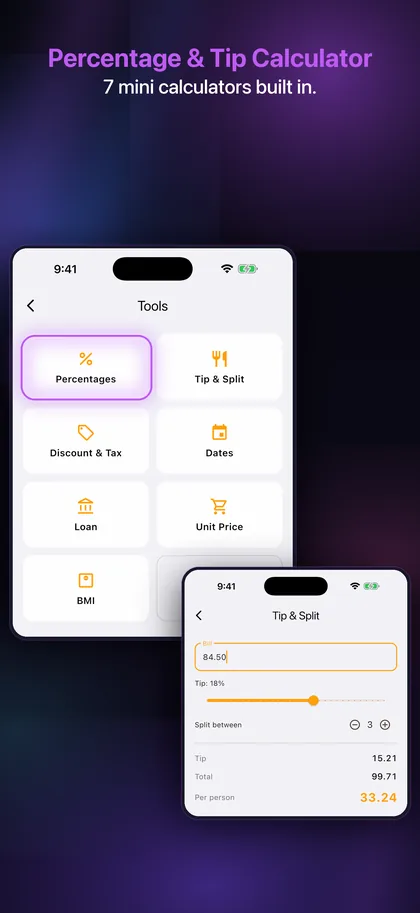
Or hold down the tip slider
Prism has a tip and split calculator built in, along with six others. No ads, no subscription. See the app.