What is the best calculator app for iPhone?
Short answer. No app wins outright, so judge on four things: does it keep a history you can scroll and edit, is the math free rather than sold, does it charge once instead of weekly, and does the listing say Data Used to Track You. Apple's own Calculator is free and untracked, and rated 3.03 stars.
Search the App Store for "calculator" and you get thirty apps with nearly the same icon. They are all free to download, which makes the ranking useless as a guide, because free to download says nothing about what the app withholds until you pay. Here is what to look at instead, and what the current top listings actually charge.
The four questions that decide it
Does it keep a history? This is the one feature that separates a calculator app from the plastic thing in a drawer, and it is the single most common complaint about the built in one. You want a tape you can scroll, tap to reuse, and correct without retyping the whole sum.
Is the math free? Percentages, fractions and scientific mode are arithmetic, not features. An app that sells them is telling you how it plans to treat you later.
Does it charge once? A calculator has no servers, no content and no running costs worth speaking of. A recurring charge for one is a pricing decision, not an economic necessity.
Does it track you? Every listing has an App Privacy section. The label to look for is Data Used to Track You, which means data leaves the app and is linked to you across other companies' apps and sites. On a calculator that is a choice somebody made on purpose.
What the top listings charge, as of 19 August 2026
Read from the live US App Store listings on 19 August 2026. Prices are the in-app purchase tiers Apple shows on each listing; ratings are the US rating average and count on the same day.
| App | What it charges | App Privacy | Rating |
|---|---|---|---|
| Apple Calculator | Nothingno in-app purchases listed | No tracking label | 3.039,713 ratings |
| Calculator₊ | $0.99 to $8.99 per subscription tierfractions and currency a separate $14.99 | Data Used to Track You | 4.671,726,914 ratings |
| Calculator‰ | Nothingno in-app purchases listed | Data Used to Track You | 4.87409,064 ratings |
| Basic Calculator+ | Nothingno in-app purchases listed | Data Used to Track You | 4.85257,925 ratings |
| Calculator⁼ | $1.99 a week to $9.99 a year$14.99 lifetime | Data Used to Track You | 4.63358,334 ratings |
| Calculator Air | $4.99 to $9.99 per week$69.99 or $99.99 a year | Data Used to Track You | 4.6983,392 ratings |
| Calculate84 | $2.99 a month or $6.99 a yearlifetime tiers $6.99 to $29.99 | Data Used to Track You | 4.7852,332 ratings |
| Calculator with History + | $9.99 once"unlock permanently" | No tracking label | 4.6824,931 ratings |
| Fraction Calculator Plus | $1.99 to $24.99plus $3.99 to remove ads | Data Used to Track You | 4.8622,163 ratings |
| Prism Calculator | $3.99 onceunlocks everything | Data Not Collected | Newno ratings yet |
Do the weekly arithmetic before you tap
A weekly price is designed to be read as a small number. Multiply it out and it stops being small.
$9.99 per week   ×  52  =  $519.48 per year
$5.99 per week   ×  52  =  $311.48 per year
$1.99 per week   ×  52  =  $103.48 per year

same listing, annual plan          $99.99
weekly billing costs               519.48 / 99.99  =  5.2× as much
That top row is not hypothetical. Calculator Air's listing shows a three day free trial followed by $9.99 a week, and the same listing sells a year for $99.99. Anyone who takes the trial and forgets pays about five times the price of the plan sitting next to it.
Monthly plans do the same thing more politely. Calculate84 lists $2.99 a month and $6.99 a year, so twelve monthly charges come to $35.88, or 5.1 times the annual price. The subscription is not really a price. It is a bet on you not doing this multiplication.
Paying extra for arithmetic
The clearest signal in the whole category is which apps sell math separately. On 19 August 2026 the Calculator₊ listing carried a purchase called Smart Currency & Fraction Calc at $14.99, on top of its subscriptions. Fraction Calculator Plus listed tiers up to $24.99.
Fractions are fourth grade arithmetic. A calculator that keeps 2 3/4 as 2 3/4 instead of flattening it to 2.75 is doing something genuinely useful, and it is also doing something that costs a developer nothing per user. Charging $14.99 for it is a position on what a customer is for. If you want the method rather than the app, we wrote up how to add fractions by hand.
Ratings measure none of this
The ratings column is the least useful one on the page, and it is worth saying why. Apple's Calculator sits at 3.03 while Calculator‰ sits at 4.87, a gap of 1.84 stars, and the App Store's own default calculator is the worst rated calculator on the store.
Ratings also compound with age and install base. Calculator₊ has 1,726,914 US ratings against Apple's 9,713, roughly 178 times as many, which reflects a decade of prompting rather than a decade of being 1.84 stars better. Read the one and two star reviews instead of the average. That is where the ads, the billing surprises and the missing history actually show up.
The part nobody benchmarks: the arithmetic itself
Almost every calculator on the store, including the one built into your phone, does its sums in binary floating point. Most of the time you never notice. Occasionally you do, because a tenth cannot be written exactly in binary any more than a third can be written exactly in decimal.
binary floating point         0.1 + 0.2  =  0.30000000000000004
                              1.1 − 1.0  =  0.10000000000000009

exact decimal (Prism keypad)  0.1 + 0.2  =  0.3
                              1.1 − 1.0  =  0.1
One stray digit is harmless. A column of them, summed, is a receipt that does not balance. Prism's keypad runs exact decimal arithmetic rather than binary floating point, which is why 0.1 + 0.2 returns exactly 0.3 there. It is not a headline feature and no store listing will tell you about it, which is rather the point.
So which one
Depends what you are, and the honest answer is that most people should try two.
| If you | Look for |
|---|---|
| Only ever add up a few numbers | The built in Calculator. It is free, it has no purchases, and its worst flaw is that it forgets. |
| Want a scrollable, editable history | Any app whose screenshots show a tape, and check the history is not behind the paywall. |
| Work in fractions or units | An app that keeps fractions unflattened, and does not price them as a separate purchase. |
| Refuse to rent a calculator | A one time unlock. Check the listing shows a single non-consumable price and not a lifetime tier sitting beside four subscriptions. |
| Care about tracking | The App Privacy section, specifically the absence of Data Used to Track You. |
Whatever you pick, open the App Privacy section and the in-app purchase list before you install, not after. Both are on every listing, both take ten seconds, and between them they answer the two questions the star rating never will. For the pricing side of that in more detail, we compared which calculator apps have no subscription.
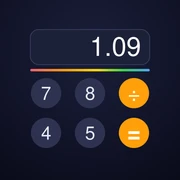
What Prism does about all four
History you can scroll and reuse, fractions, percentages and scientific mode free forever, no ads, no tracking, and one $3.99 purchase for the themes, currency and converters. No subscription, now or ever. See the app.
Method. In-app purchase tiers, App Privacy labels, rating averages and rating counts were read from the live US App Store listings on 19 August 2026, using the public listing pages and Apple's lookup API. Apps shown are calculators appearing in the top US App Store results for "calculator" on that date. Prices, ratings and privacy labels change, so treat every number here as a snapshot of that day rather than a standing fact. Prism Calculator is our own app, which is why its row is marked. Where a listing sells an ad free upgrade, we have not tried to characterise how intrusive the ads are; the listing itself does not say.